Commander
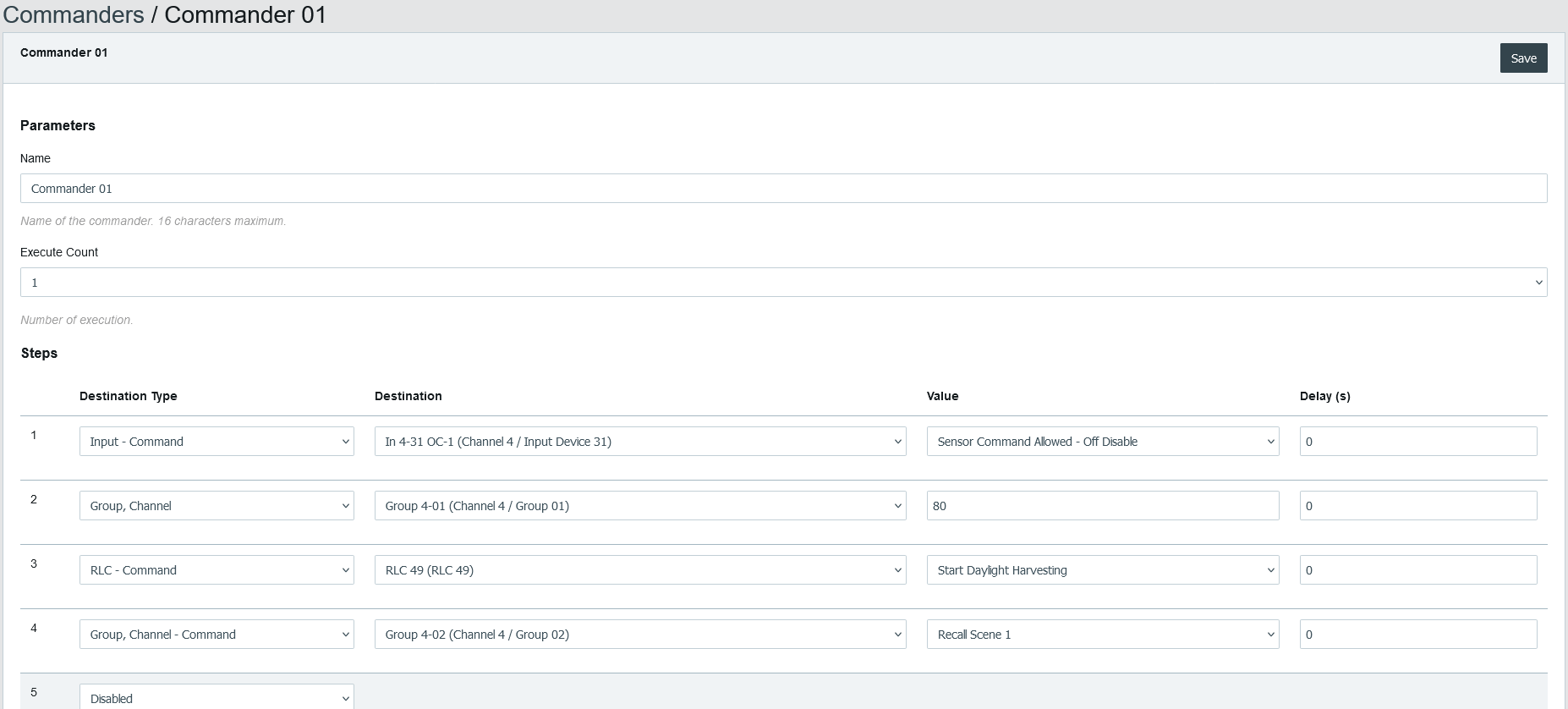
The Commanders allow sending multiple commands in sequence. The sequence can be executed once, executed a number of times or executed until stopped manually.
The Commanders can be started or stopped from a schedule, a DALI-2 button, the occupancy of a Room Light Control, BACnet or the web interface.
The commands can be used to control one of the following:
- Control the light intensity of a group or channel.
- Send a command to a group or channel (Recall Scene, Recall Min Level, etc.).
- Control the colour of group or channel.
- Enable or disable a DALI-2 sensor or button.
- Send a command to a Room Light Control (Start Daylight Harvesting, Stop Demand Response, etc.).
- Enable or disable a schedule.
- Start or stop the execution of another commander.
Specifications
There are 64 commanders that can execute up to 12 commands each.
Considering that a command can be configured to start another commander, the total number of commands for a single commander Start can be extended beyond the limitation of 12 command for a single commander.
Parameters
Name
The name of the commander is limited to 16 characters.
Execute Count
The number of executions of the commander. This also allows disabling the commander.
Steps
The list of commands to be executed.
Destination Type
The destination type.
| Destination Type | Description |
|---|---|
| Disabled | Disabled |
| Group, Channel | Group intensity |
| Group, Channel - Command | Command for a group |
| Group, Channel - Colour | Group colour |
| Lamp | Lamp intensity |
| Lamp - Command | Command for a lamp |
| Lamp - Colour | Lamp colour |
| Input Device | Command for sensor and button |
| RLC - Command | Command for a Room Light Control |
| Schedule - Command | Command for a Schedule |
| Commander - Command | Command for a Commander |
| Commanders - Command | Command for the Commanders |
| Remote Link | Sends a button short press into a Link ID |
Disabled
The step is ignored.
Group, Channel
The value is the light intensity for a group or channel.
Group, Channel - Command
For the list of available commands refer to the section "Multi-State Output Object - Command Control of Lamp, Group and Channel".
Group, Channel - Colour
The value is the light intensity and colour for a group or channel.
Lamp
The value is the light intensity for a single lamp.
Lamp - Command
For the list of available commands refer to the section "Multi-State Output Object - Command Control of Lamp, Group and Channel".
Lamp - Colour
The value is the light intensity and colour for a single lamp.
Input - Command
Allows to enable or disable a DALI-2 sensor or button.
RLC - Command
For the list of available commands refer to the property section "Command" of the "Loop Object - Room Light Control".
Schedule - Command
Allows to enable or disable a schedule.
Commander - Command
Allows to start or stop a specific Commander. The destination is a single Commander and the value is the command Start or Stop for this Commander.
Commanders - Command
Allows to start or stop a Commander.
Remote Link
Sends a short press event into a Link ID (1-32767). Virtual buttons on any controller of the same Link Network that follow this Link ID execute it, exactly like a shared DALI push button short press. See Remote Link.
The value is the Link ID. In the web interface this field is currently labelled Link Group, although the value is the Link ID used everywhere else.
Fade Time
The fade time used by the command with the destination type Group, Channel.
Delay
The delay in seconds before the execution of the step.