Web User Interface - Data
Data
Data Points
The BACnet objects are listed.
Schedules
The schedules allow to automatically adjust the light intensity at a specific time for the groups, channels and scene controllers.
There are 4 (4 DALI channels model), 1 (1 DALI channel model) schedules of 7 weekdays and each day can execute up to 6 different events. Each schedule can control up to 4 different data points.
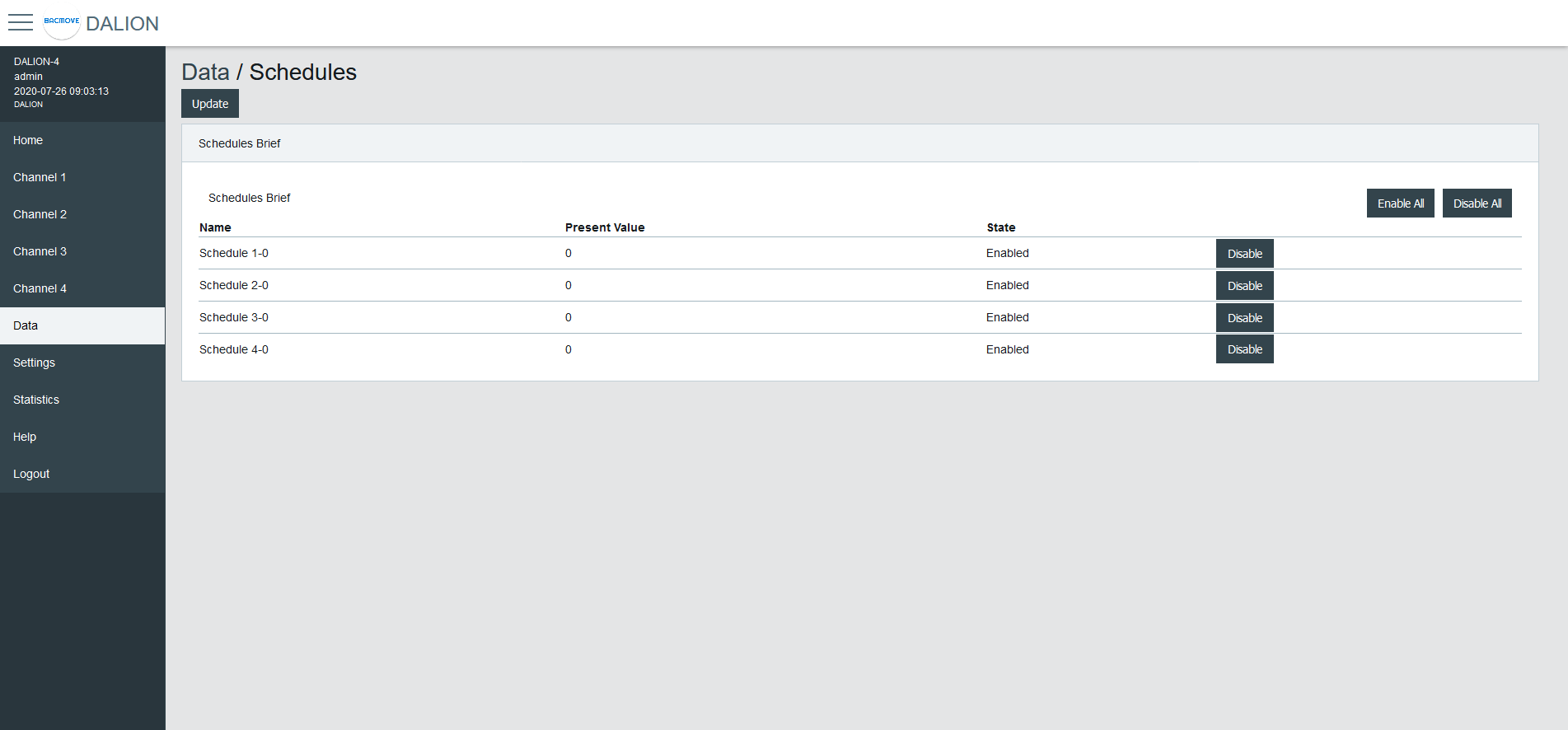
Schedules Brief
Displays the current values of the schedules and allows to Enable or Disable them.
Clicking on a schedule row allows to modify its parameters and events.
Schedule Parameters
Allows to modify the parameters of a schedule such as its name and its output data point.
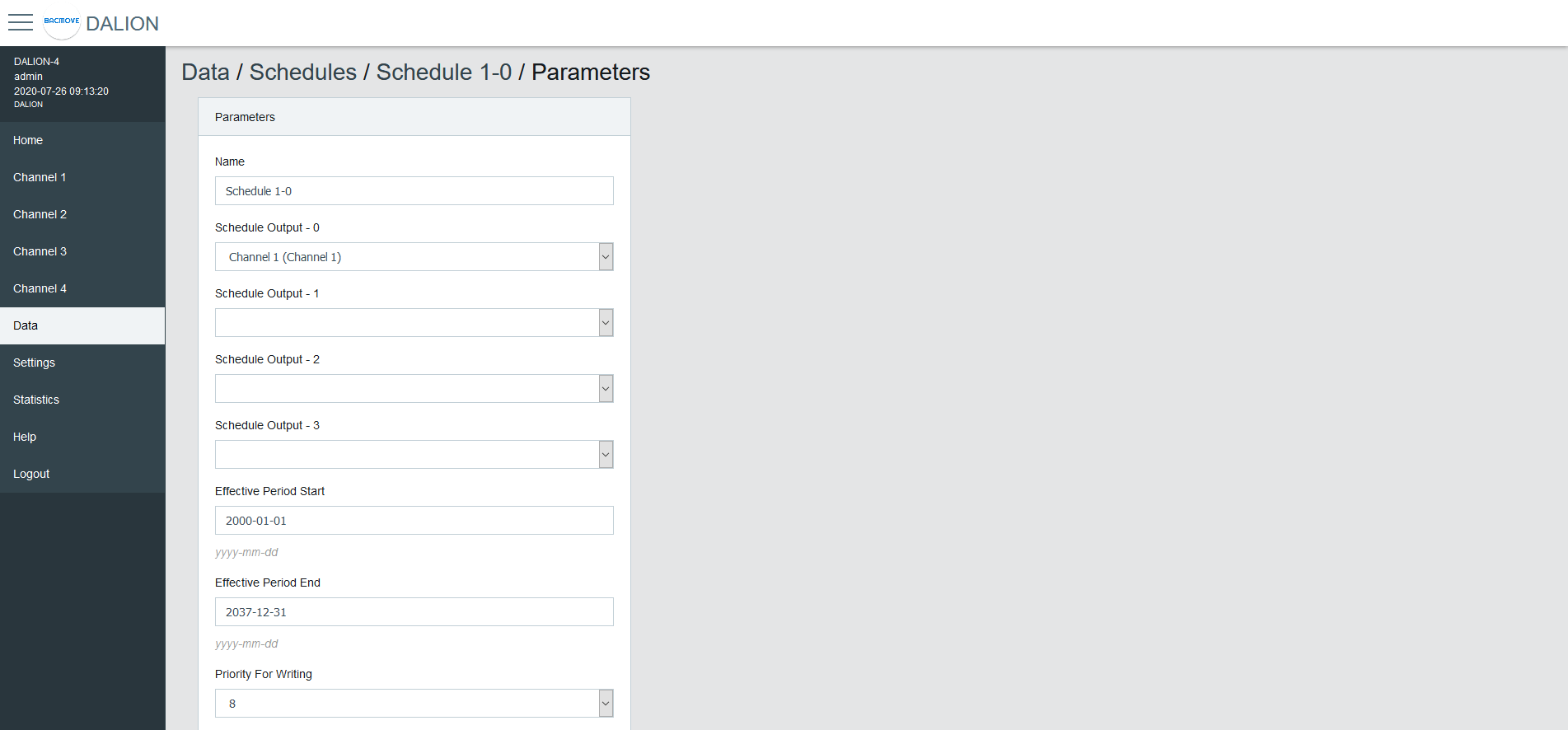
| Name | Unit | Minimum | Maximum | Default | Description |
|---|---|---|---|---|---|
| Name | String | 32 characters | Name of the schedule | ||
| Output Type | Choice | The type of output | |||
| Schedule Output 1 | Data Point | Data point where the schedule writes | |||
| Schedule Output 2 | Data Point | Data point where the schedule writes | |||
| Schedule Output 3 | Data Point | Data point where the schedule writes | |||
| Schedule Output 4 | Data Point | Data point where the schedule writes | |||
| Effective Period Start | Date | First date on which the schedule is in effect | |||
| Effective Period End | Date | Last date on which the schedule is in effect | |||
| Priority For Writing | Number | 1 | 16 | 8 | Priority used by the schedule when writing |
| Schedule Default | Number | Default value of the schedule | |||
| BACnet Object | String | BACnet object identifier of the schedule |
Output Type
Group, Channel
Allows sending command to a group or channel.
Commander
Allows sending command to a single commander.
Commanders
Allows sending command to a commander.
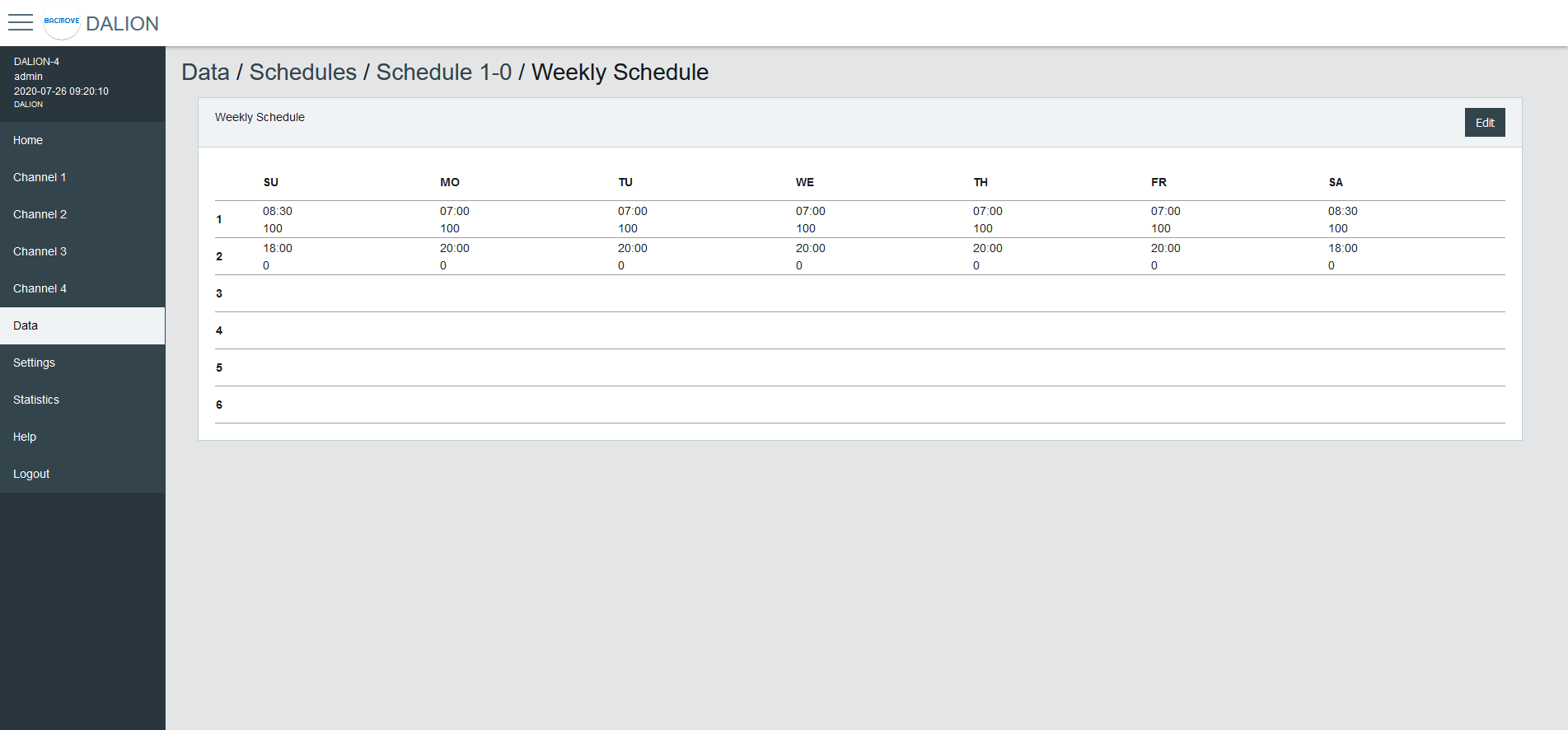
Weekly Schedule
Displays the scheduled events of the schedule.
Weekly Schedule Edit
Allows modifying the schedule events.
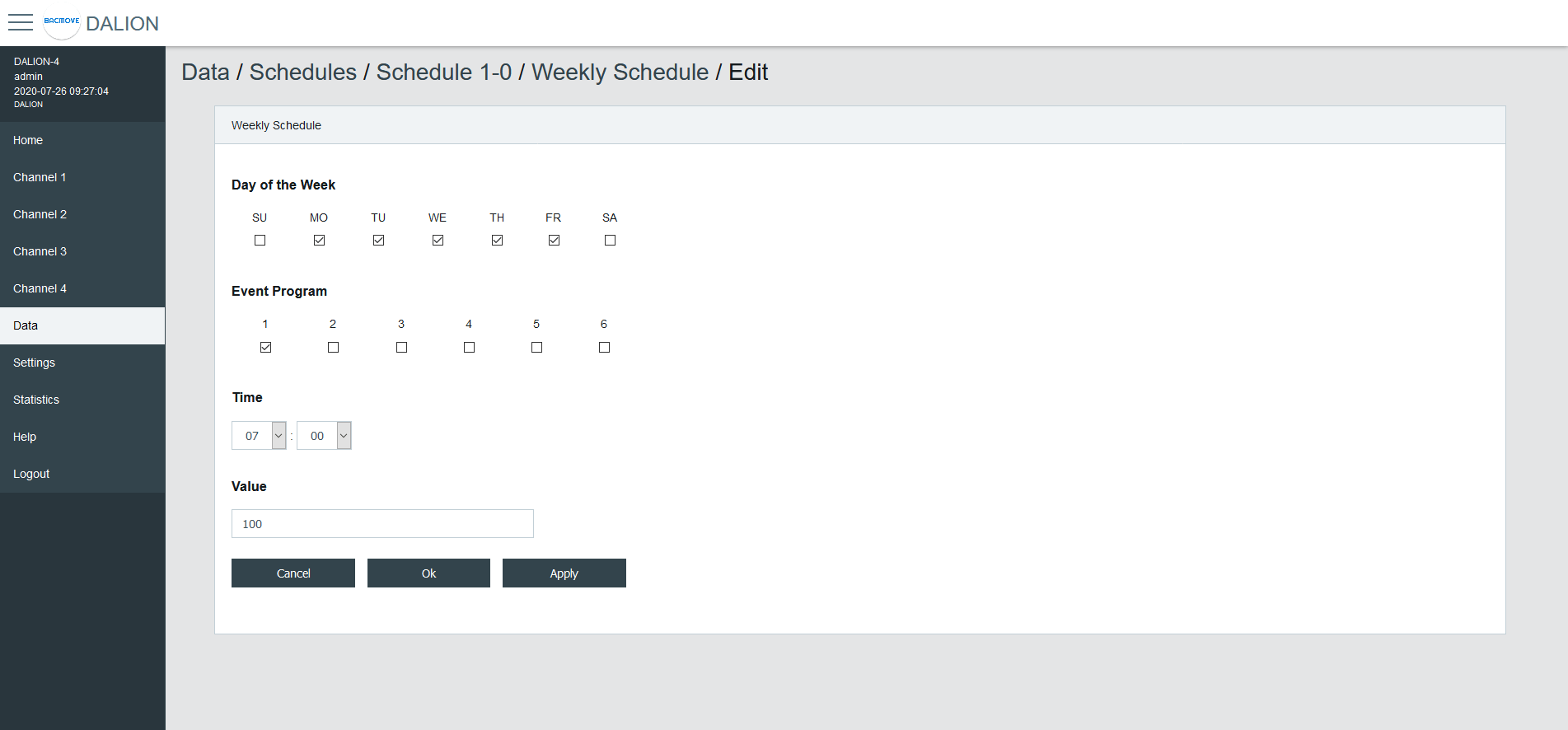
Day of the Week
Allows selecting the days of the week to modify. Several days can be modified at the same time.
Event Program
Allows selecting the event program to modify.
Type
The type of event time.
| Type | Description |
|---|---|
| Time | Fixed time |
| Sunrise | Astronomical sunrise time |
| Sunset | Astronomical sunset time |
Time
The time of the event.
By Selecting -- : -- the events corresponding to the selected Day of the Week and Event Program will be deleted.
Offset
For astronomical time allows for an offset of 120 minutes before or after the astronomical time.
Earliest Time
For astronomical time allows limiting the earliest time that the event can occur.
Execute Earliest
For astronomical time allows executing the event if it were to occur before the Earliest Time.
Latest Time
For astronomical time allows limiting the latest time that the event can occur.
Execute Latest
For astronomical time allows executing the event if it were to occur after the Latest Time.
Value
The value written by the schedule at the specified time.
Buttons
The Ok button applies the modification of the schedule events and returns to the Weekly Schedule page. The button Apply applies the modification but remains on the same page to allow the entry of more events. The button Cancel returns to the Weekly Schedule page without modifying the events.
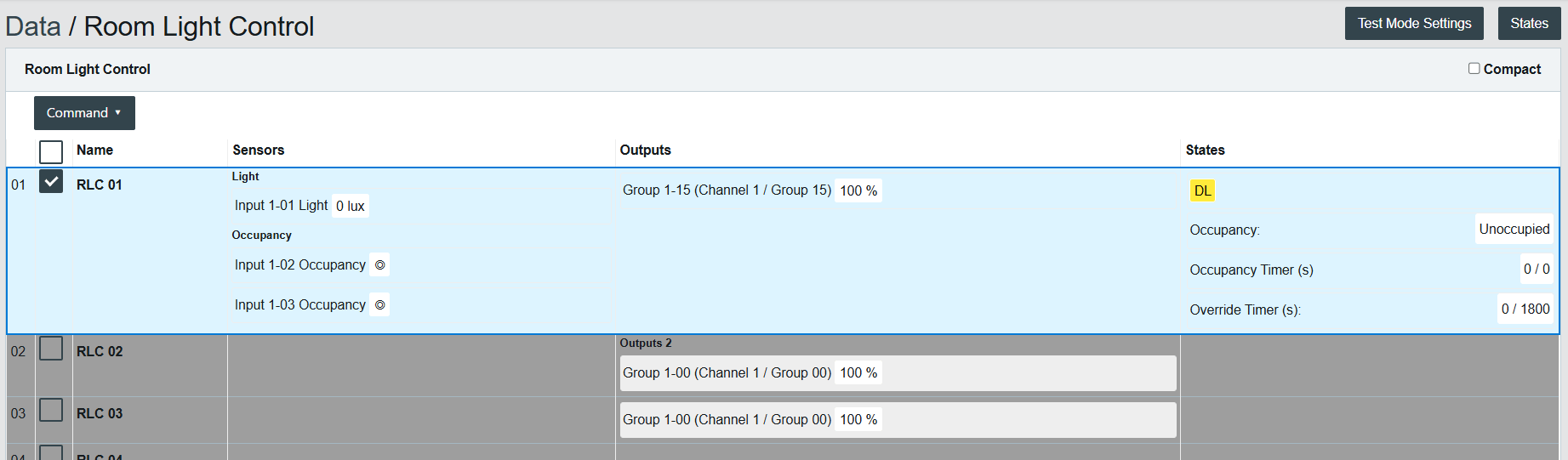
Room Light Control
The Room Light Control allow to automatically adjust the light intensity depending of external inputs such as occupancy, presence and light sensors.
Room Light Control List
Lists all the available Room Light Control. It also indicates the current states of the occupancy, light sensors and outputs.
Clicking on a Room Light Control row allows to modify its parameters.
Room Light Control Parameters
Allows to modify the parameters of a Room Light Control such as its name, its timings and its output data points.
Refer to the associated BACnet object for further details.
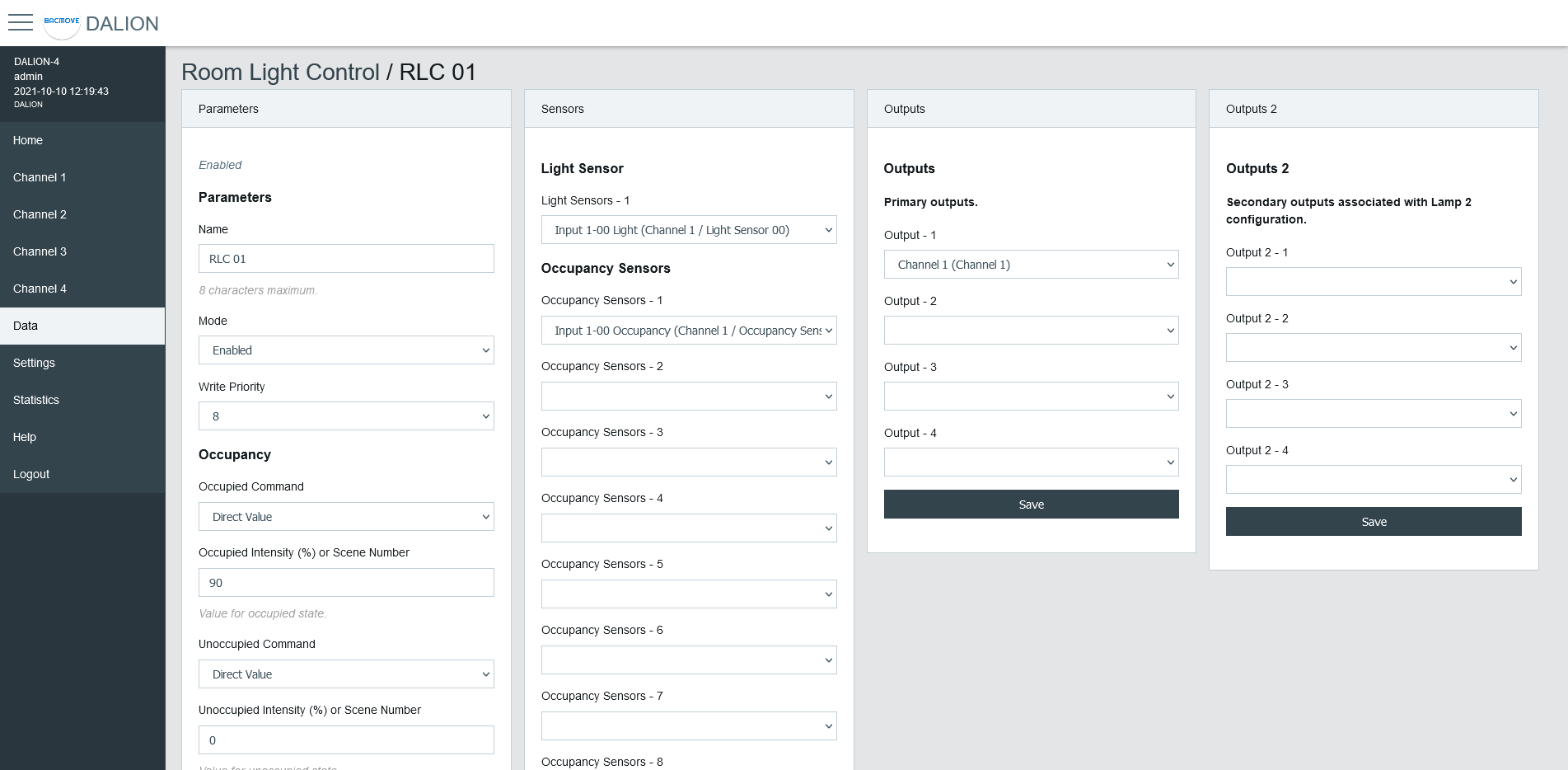
Parameters
| Name | Unit | Limit | Default | Description |
|---|---|---|---|---|
| Name | String | 8 characters | RLC NN, where NN is the number of the Room Light Control | Name of the Room Light Control. |
| Mode | Choice | Enabled, Disabled | Disabled | Allows to enable and disable the Room Light Control. |
| Write Priority | Number | 1-16 | 8 | Priority for writing to the outputs. |
Occupancy
| Name | Unit | Limit | Default | Description |
|---|---|---|---|---|
| Occupied Command | Choice | Disabled, Direct Value, Max Level, Off, Min Level, Recall Scene, Start Daylight Harvesting, Stop Daylight Harvesting | Disabled | Command executed when entering the occupied state. |
| Occupied Intensity (%) or Scene Number | Percent or Number | 0-100% or 0-15 Scene Number | 0 | The value for the Occupied Command. |
| Unoccupied Command | Choice | Disabled, Direct Value, Max Level, Off, Min Level, Recall Scene, Start Daylight Harvesting, Stop Daylight Harvesting | Disabled | Command executed when entering the unoccupied state. |
| Unoccupied Intensity (%) or Scene Number | Percent or Number | 0-100% or 0-15 Scene Number | 0 | The value for the Unoccupied Command. |
| Warning Command | Choice | Disabled, Direct Value, Max Level, Off, Min Level, Recall Scene, Start Daylight Harvesting, Stop Daylight Harvesting | Disabled | Command executed when entering the warning state. |
| Warning Intensity (%) or Scene Number | Percent or Number | 0-100% or 0-15 Scene Number | 0 | The value for the Warning Command. |
| Warning Time | Seconds | 0 - 2 400 | 0 (disabled) | The warning time. |
| Hold Time | Seconds | 0 - 2 400 | 0 (disabled) | Hold time for occupancy state. |
| Ignore Time | Seconds | 0 - 2 400 | 0 (disabled) | Time where the occupation update is ignored after the lamp goes Off. |
| Override Time | Seconds | 0 - 72 000 | 0 | Time where the unoccupied state is temporarily overwritten by the occupied state. |
| Occupied Mode Command Enable | Choice | No Command, Unoccupied Command, Occupied Command, Unoccupied and Occupied Command | Unoccupied and Occupied Command | It allows enabling and disabling the execution of the occupancy command when Occupied_Mode is modified. |
Daylight Harvesting
| Name | Unit | Limit | Default | Description |
|---|---|---|---|---|
| Setpoint Unoccupied | Number | 0 - 65 534 | 0 | Setpoint unoccupied for the illumination level. |
| Setpoint Occupied | Number | 0 - 65 534 | 0 | Setpoint occupied for the illumination level. |
| Deadband | Number | 0 - 65 534 | 20 | Deadband for the current setpoint. |
| Step Value | Percent | 0 - 100 | 4 | Maximum step to approach the illumination setpoint in percentage. |
| Minimum Intensity | Percent | 0 - 100 | 0 | Minimum intensity. |
| Maximum Intensity | Percent | 0 - 100 | 100 | Maximum intensity. |
| Lamp 2 Offset | Percent | 0 - 100 | 0 | Lamp 2 Offset. |
| Lamp 2 Limit | Percent | 0 - 100 | 0 | Lamp 2 Limit. |
Light Sensor
Selection of the light sensor for daylight harvesting.
Occupancy Sensor
Selection of the occupancy sensors for occupied state.
Outputs
Selection of the primary outputs.
Outputs 2
Selection of the secondary outputs.
Room Light Control States
Accessed via the Room Light Control list with the States button, displays the internal states and timers of the Room Light Control. It provides valuable information on the operations and internal states of Room Light Control, making it easier to understand their functioning.
Name
Name of the Room Light Control.
States
| Value | Description |
|---|---|
| DL | Daylight Harvesting is currently active |
| OC | Currently occupied |
| OA | Override is currently active |
| OM | Occupied Mode is occupied |
Flags
Internal information.
Occupancy State
| Value | Description |
|---|---|
| Unknown | Unknown state, this may be due to an unconfigured Room Light Control |
| Unoccupied | Unoccupied |
| Unoccupied - Wait Ignore Time | The occupancy sensors Ignore Time is currently counting |
| Occupied | Occupied |
| Occupied - Wait Hold Time | The occupancy sensors Hold Time is currently counting |
| Occupied - Wait Warning Time | Warning command was executed and Warning Time is currently counting |
Occupancy Timer (s)
Increments, in seconds, up to the configured parameter value.
Light Integrator
Internal value of the Daylight Harvesting control.
Light Prev. Error
Internal value of the Daylight Harvesting control.
Light Diff.
Internal value of the Daylight Harvesting control.
Light Prev. Meas.
Internal value of the Daylight Harvesting control.
Light Out.
Internal value of the Daylight Harvesting control.
Override Timer (s)
Increments, in seconds, up to the configured parameter value.
Views
The Views feature enables creating custom dashboards tailored to the control and monitoring needs of rooms or zones. Each view uses a grid of cells, where cells can display labels, values, buttons, or lighting commands, and automatically expand when adjacent cells are unconfigured.
Energy Usage Accumulated
It represents the accumulated energy consumption in watt-hours for the lamps. The values are the result of a calculation based on the configured nominal power.
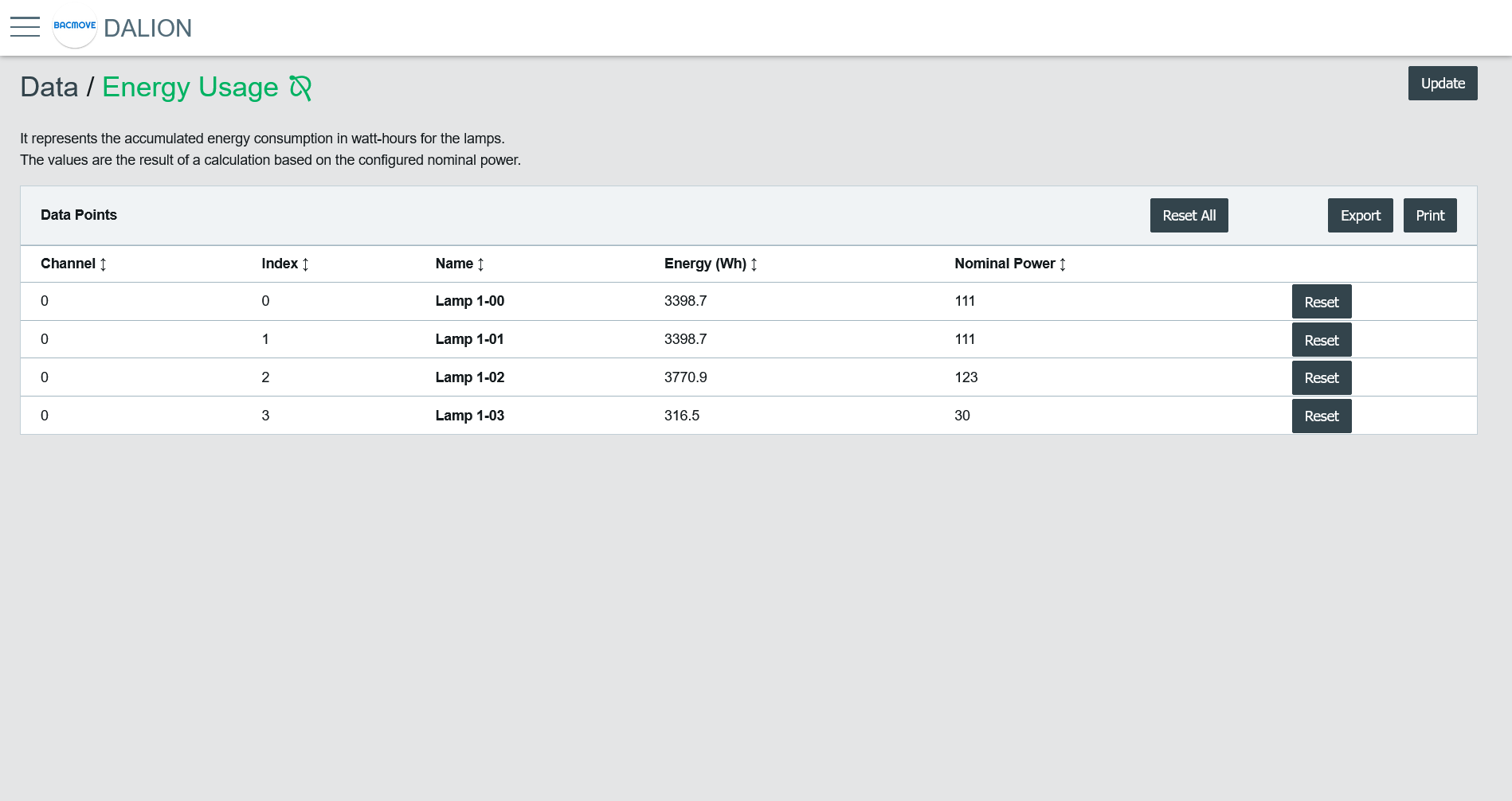
Data Points List
It list the accumulated energy for each configured lamp. Clicking on a collum name allows sorting the table.
Collumns
Channel
The lamp channel number, 1 to 4.
Index
The lamp index number, 0 to 63.
Name
The lamp name.
Energy (Wh)
The accumulated energy.
Nominal Power
The configured nominal power.
Change Time
The last time when the accumulated energy was saved.
Reset Time
The last time when the accumulated energy was reset or directly written.
Buttons
Print
It allows printing the accumulated energy consumption values.
Export
It allows downloading accumulated energy consumption values in a TSV (tab-separated values) file.
Reset All
Reset to zero the accumulated energy consumption for all lamps.
Reset
Reset to zero the accumulated energy consumption for the lamp.