Web User Interface - Automation
Automation
Data Points
The BACnet objects are listed.
Schedules
The schedules allow to automatically adjust the light intensity at a specific time for the groups, channels and scene controllers.
There are 4 (4 DALI channels model), 1 (1 DALI channel model) schedules of 7 weekdays and each day can execute up to 6 different events. Each schedule can control up to 4 different data points.
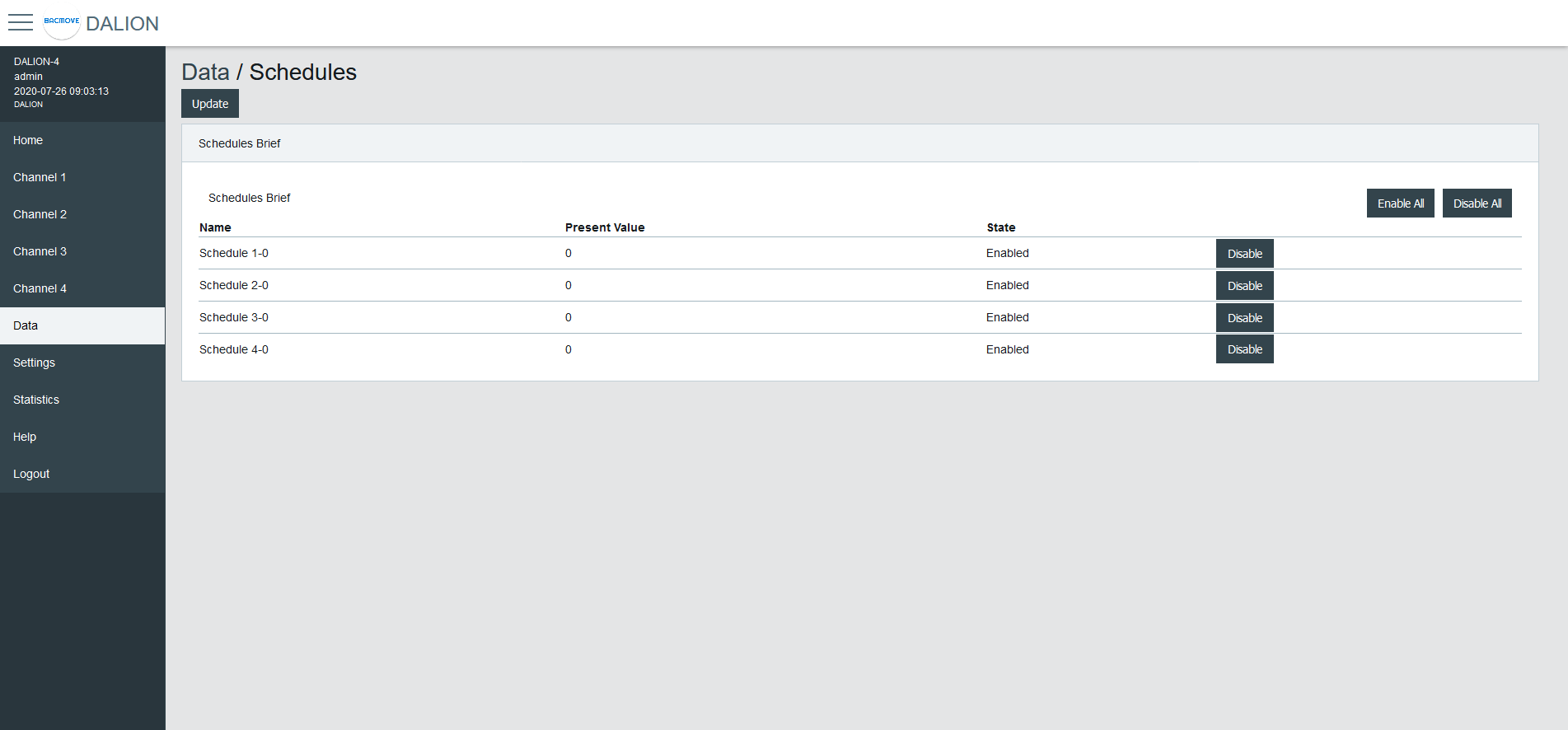
Schedules Brief
Displays the current values of the schedules and allows to Enable or Disable them.
Clicking on a schedule row allows to modify its parameters and events.
Schedule Parameters
Allows to modify the parameters of a schedule such as its name and its output data point.
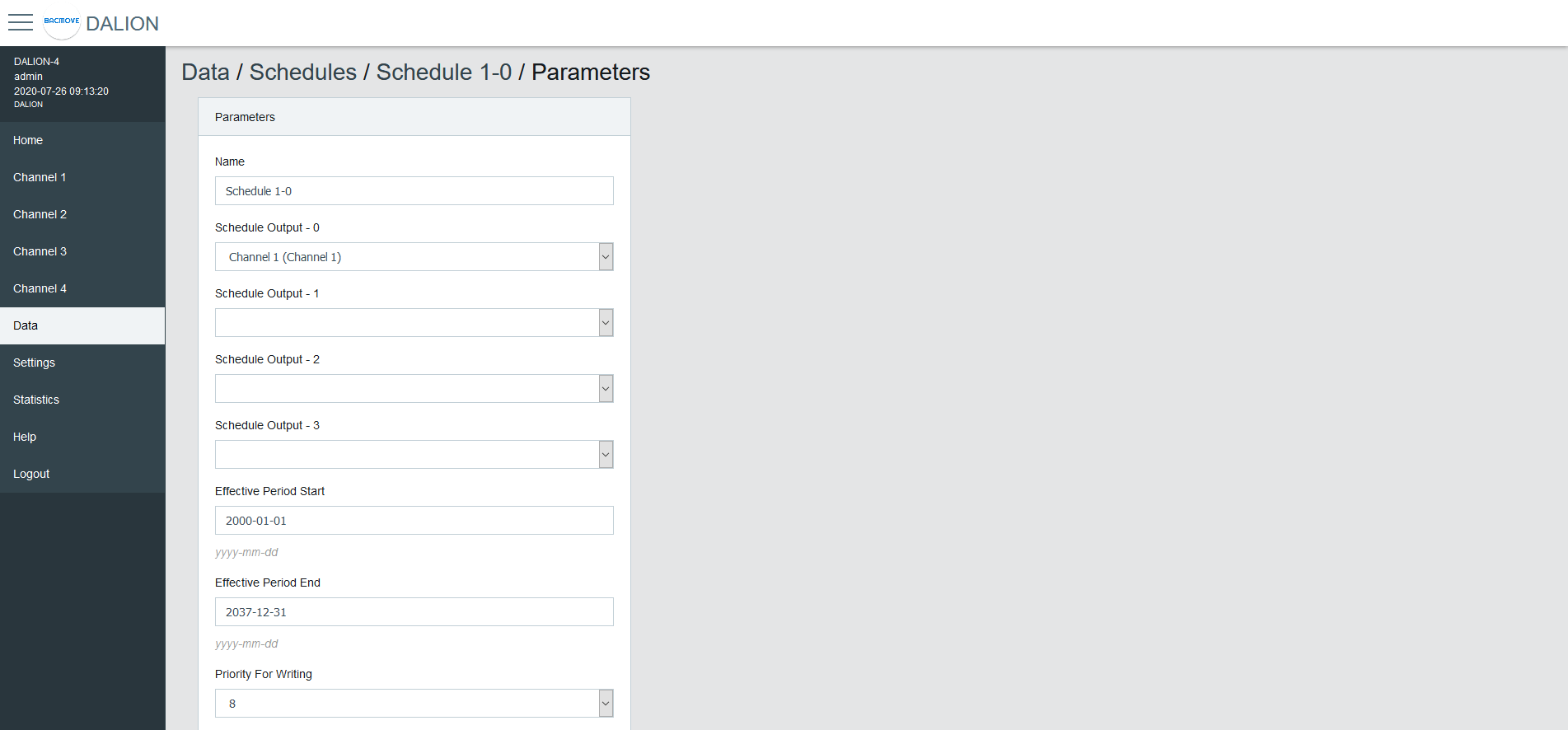
| Name | Unit | Minimum | Maximum | Default | Description |
|---|---|---|---|---|---|
| Name | String | 32 characters | Name of the schedule | ||
| Output Type | Choice | The type of output | |||
| Schedule Output 1 | Data Point | Data point where the schedule writes | |||
| Schedule Output 2 | Data Point | Data point where the schedule writes | |||
| Schedule Output 3 | Data Point | Data point where the schedule writes | |||
| Schedule Output 4 | Data Point | Data point where the schedule writes | |||
| Effective Period Start | Date | First date on which the schedule is in effect | |||
| Effective Period End | Date | Last date on which the schedule is in effect | |||
| Priority For Writing | Number | 1 | 16 | 8 | Priority used by the schedule when writing |
| Schedule Default | Number | Default value of the schedule | |||
| BACnet Object | String | BACnet object identifier of the schedule |
Output Type
Group, Channel
Allows sending command to a group or channel.
Commander
Allows sending command to a single commander.
Commanders
Allows sending command to a commander.
Group Control
Allows sending a command to a group control.
Remote Link
Sends a button short press into a Link ID (1-32767). Virtual buttons on any controller of the same Link Network that follow this Link ID execute it, like a shared DALI push button short press. The event value is the Link ID.
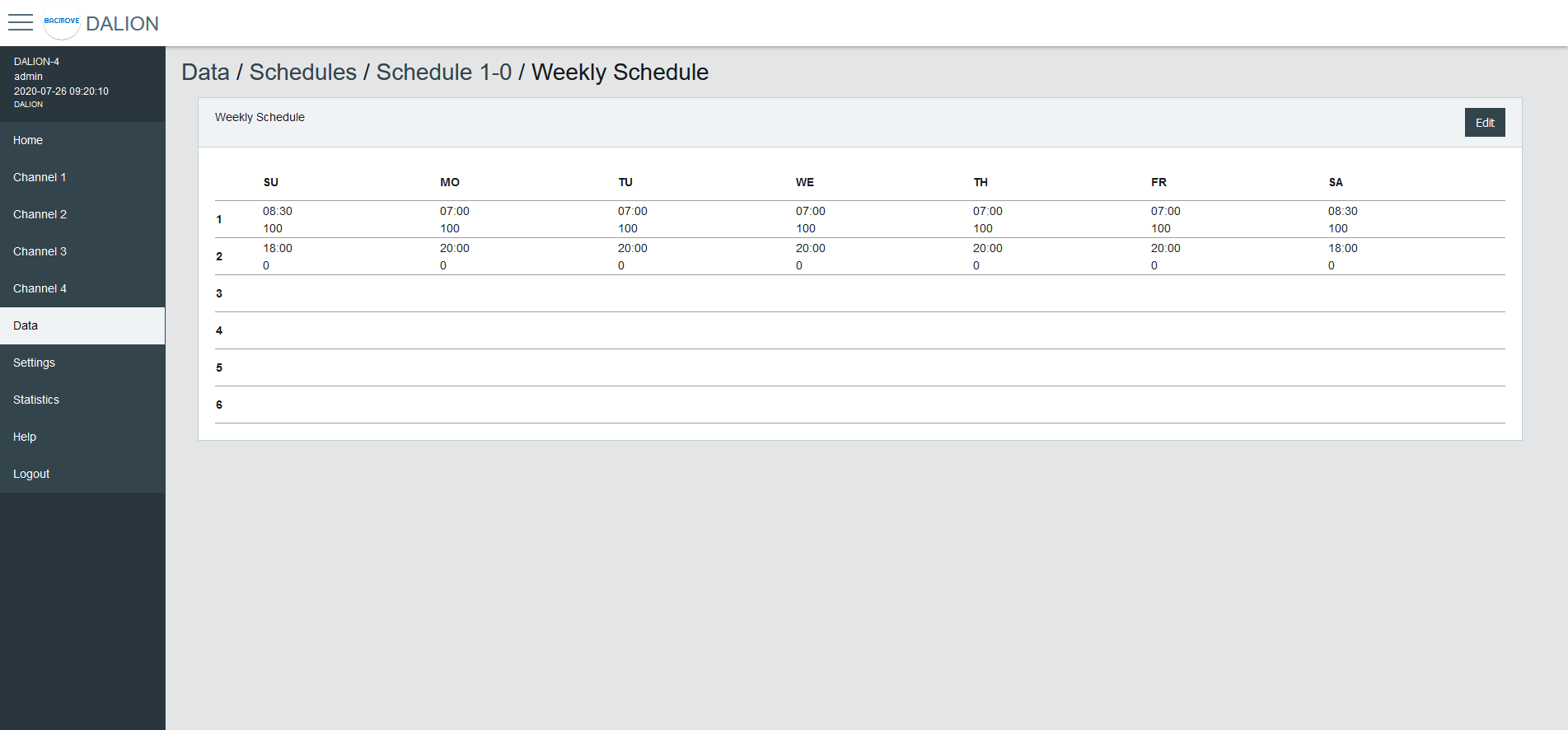
Weekly Schedule
Displays the scheduled events of the schedule.
Weekly Schedule Edit
Allows modifying the schedule events.
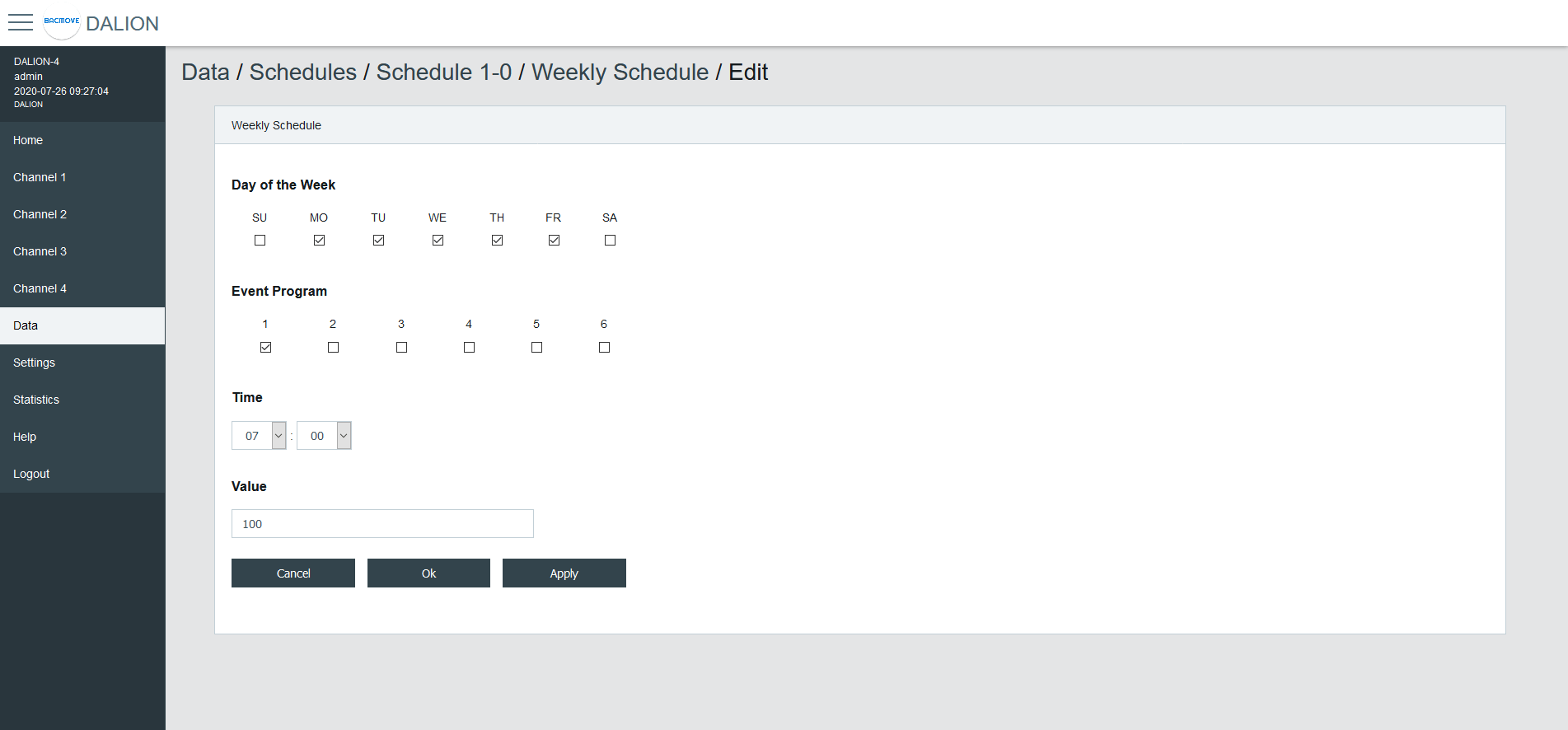
Day of the Week
Allows selecting the days of the week to modify. Several days can be modified at the same time.
Event Program
Allows selecting the event program to modify.
Type
The type of event time.
| Type | Description |
|---|---|
| Time | Fixed time |
| Sunrise | Astronomical sunrise time |
| Sunset | Astronomical sunset time |
Time
The time of the event.
By Selecting -- : -- the events corresponding to the selected Day of the Week and Event Program will be deleted.
Offset
For astronomical time allows for an offset of 120 minutes before or after the astronomical time.
Earliest Time
For astronomical time allows limiting the earliest time that the event can occur.
Execute Earliest
For astronomical time allows executing the event if it were to occur before the Earliest Time.
Latest Time
For astronomical time allows limiting the latest time that the event can occur.
Execute Latest
For astronomical time allows executing the event if it were to occur after the Latest Time.
Value
The value written by the schedule at the specified time.
Buttons
The Ok button applies the modification of the schedule events and returns to the Weekly Schedule page. The button Apply applies the modification but remains on the same page to allow the entry of more events. The button Cancel returns to the Weekly Schedule page without modifying the events.
Room Light Control
The Room Light Control allow to automatically adjust the light intensity depending of external inputs such as occupancy, presence and light sensors.
Room Light Control List
Lists all the available Room Light Control. It also indicates the current states of the occupancy, light sensors and outputs.
Clicking on a Room Light Control row allows to modify its parameters.
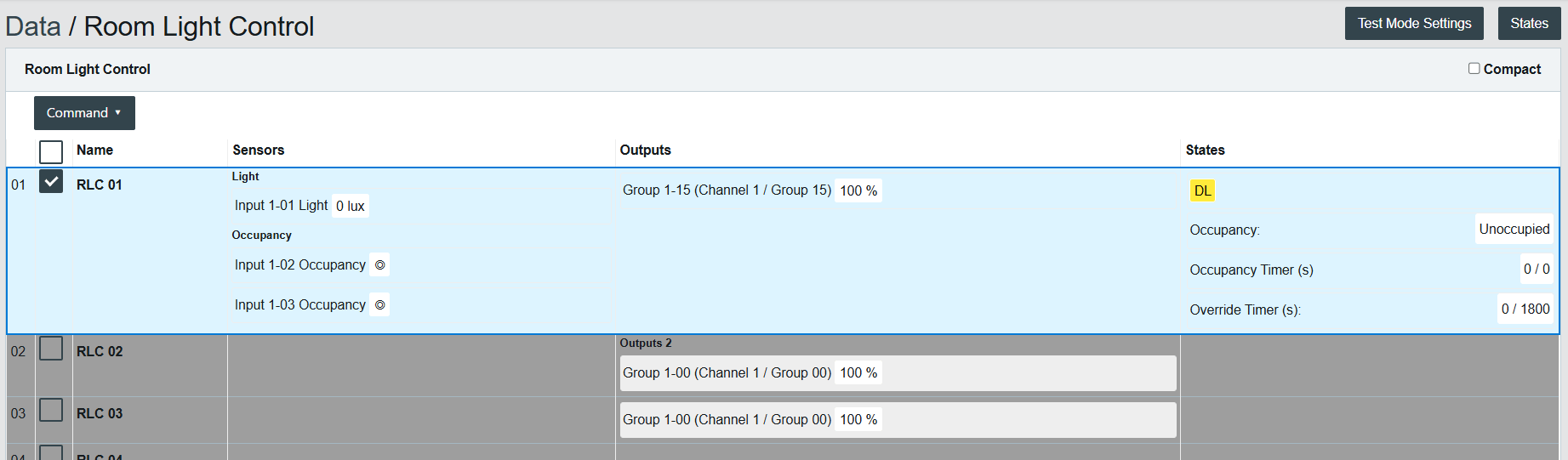
For each Room Light Control, the list also shows its active profile, the inputs that currently report it occupied and the source of an active warning hold.
Occupancy Sources
Indicates which inputs currently report the Room Light Control as occupied.
| Source | Description |
|---|---|
| Sensors (direct) | Occupancy sensors sending directly to this Room Light Control. |
| Buttons | Buttons with an occupancy command for this Room Light Control. |
| External (Network) | External Occupancy inputs written over the network (writer slots). |
| Linked Rooms | Held occupied by a linked Room Light Control. |
Warning Hold
Indicates when the Room Light Control is held at its warning level, and its source: an External Warning Hold input (network) or a linked Room Light Control.
Active Profile
Indicates the profile whose occupancy and daylight harvesting parameters the Room Light Control currently follows.
Room Light Control Parameters
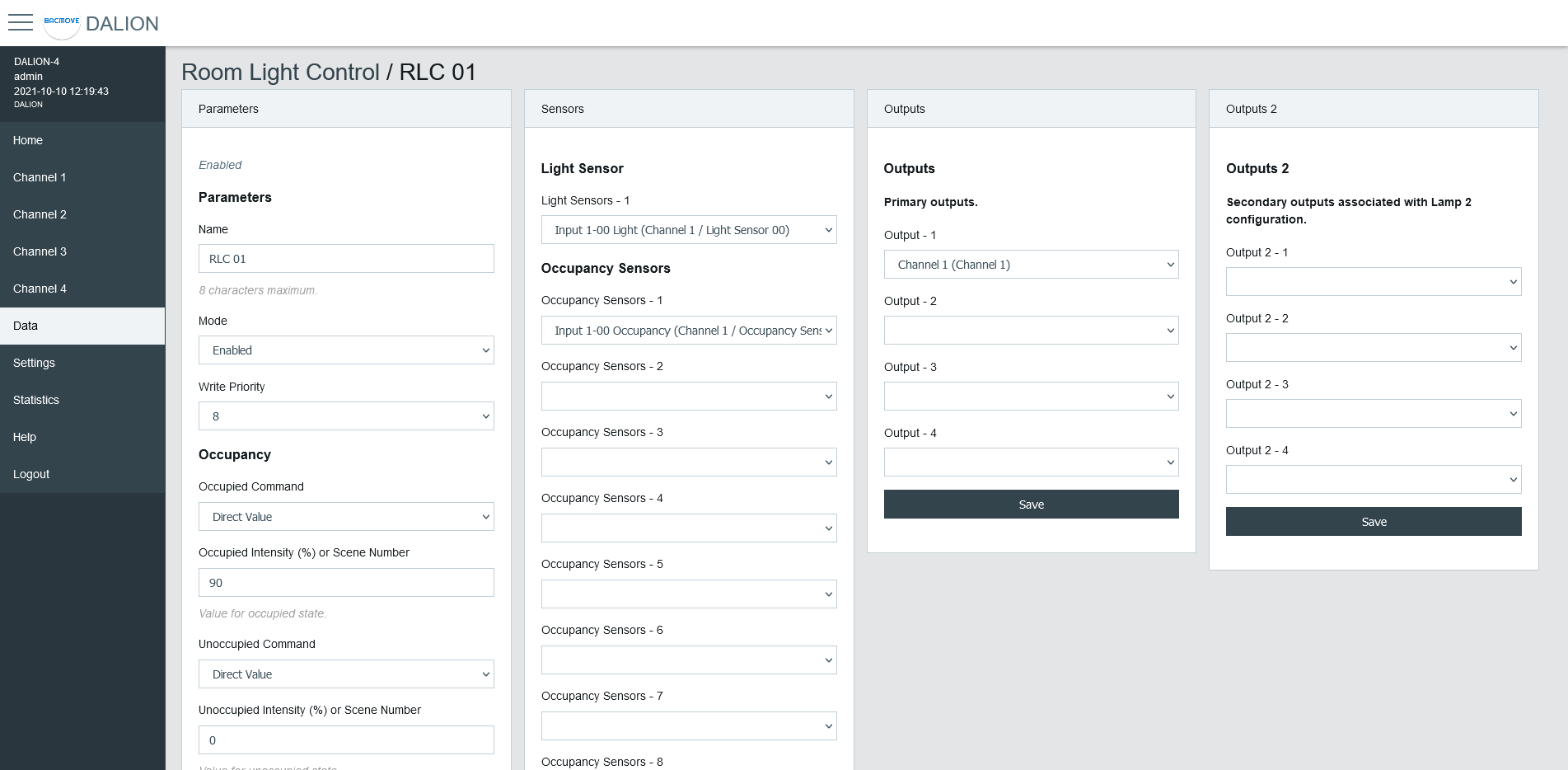
Allows to modify the parameters of a Room Light Control such as its name, its timings and its output data points.
Refer to the associated BACnet object for further details.
Parameters
| Name | Unit | Limit | Default | Description |
|---|---|---|---|---|
| Name | String | 8 characters | RLC NN, where NN is the number of the Room Light Control | Name of the Room Light Control. |
| Mode | Choice | Enabled, Disabled | Disabled | Allows to enable and disable the Room Light Control. |
| Write Priority | Number | 1-16 | 8 | Priority for writing to the outputs. |
Profile
Assigns a Room Light Control Profile that the Room Light Control follows instead of its own parameters. A different profile can be assigned for the occupied and the unoccupied Occupied Mode.
An assigned profile overrides the occupancy commands, times and daylight harvesting values of the Room Light Control. Those fields stay editable and are used again when no profile is assigned.
| Name | Description |
|---|---|
| Profile (Occupied Mode: Occupied) | The profile followed while the Occupied Mode is occupied. |
| Profile (Occupied Mode: Unoccupied) | The profile followed while the Occupied Mode is unoccupied. |
Occupancy
| Name | Unit | Limit | Default | Description |
|---|---|---|---|---|
| Occupied Command | Choice | Disabled, Direct Value, Max Level, Off, Min Level, Recall Scene, Start Daylight Harvesting, Stop Daylight Harvesting | Disabled | Command executed when entering the occupied state. |
| Occupied Intensity (%) or Scene Number | Percent or Number | 0-100% or 0-15 Scene Number | 0 | The value for the Occupied Command. |
| Unoccupied Command | Choice | Disabled, Direct Value, Max Level, Off, Min Level, Recall Scene, Start Daylight Harvesting, Stop Daylight Harvesting | Disabled | Command executed when entering the unoccupied state. |
| Unoccupied Intensity (%) or Scene Number | Percent or Number | 0-100% or 0-15 Scene Number | 0 | The value for the Unoccupied Command. |
| Warning Command | Choice | Disabled, Direct Value, Max Level, Off, Min Level, Recall Scene, Start Daylight Harvesting, Stop Daylight Harvesting, Blink Warning | Disabled | Command executed when entering the warning state. Blink Warning blinks the lights off briefly and returns them to their previous level. |
| Warning Intensity (%) or Scene Number | Percent or Number | 0-100% or 0-15 Scene Number | 0 | The value for the Warning Command. |
| Warning Time | Seconds | 0 - 2 400 | 0 (disabled) | The warning time. |
| Hold Time | Seconds | 0 - 2 400 | 0 (disabled) | Hold time for occupancy state. |
| Ignore Time | Seconds | 0 - 2 400 | 0 (disabled) | Time where the occupation update is ignored after the lamp goes Off. |
| Walk-Through Mode | Choice | Enabled, Disabled | Disabled | When enabled, an occupancy shorter than 1/8 of the Hold Time shortens the Hold Time to 1/4 of its value. |
| Override Time | Seconds | 0 - 72 000 | 0 | Time where the unoccupied state is temporarily overwritten by the occupied state. |
| Occupied Mode Command Enable | Choice | No Command, Unoccupied Command, Occupied Command, Unoccupied and Occupied Command | Unoccupied and Occupied Command | It allows enabling and disabling the execution of the occupancy command when Occupied_Mode is modified. |
Daylight Harvesting
| Name | Unit | Limit | Default | Description |
|---|---|---|---|---|
| Setpoint Unoccupied | Number | 0 - 65 534 | 0 | Setpoint unoccupied for the illumination level. |
| Setpoint Occupied | Number | 0 - 65 534 | 0 | Setpoint occupied for the illumination level. |
| Deadband | Number | 0 - 65 534 | 20 | Deadband for the current setpoint. |
| Step Value | Percent | 0 - 100 | 4 | Maximum step to approach the illumination setpoint in percentage. |
| Minimum Intensity | Percent | 0 - 100 | 0 | Minimum intensity. |
| Maximum Intensity | Percent | 0 - 100 | 100 | Maximum intensity. |
| Lamp 2 Offset | Percent | 0 - 100 | 0 | Lamp 2 Offset. |
| Lamp 2 Limit | Percent | 0 - 100 | 0 | Lamp 2 Limit. |
Light Sensor
Selection of the light sensor for daylight harvesting.
Occupancy Sensor
Selection of the occupancy sensors for occupied state.
Linked Occupancy
Selection of up to four other Room Light Controls that this Room Light Control holds while its own occupancy state is occupied. Refer to the associated BACnet Loop object for the hold mode details.
Outputs
Selection of the primary outputs.
Outputs 2
Selection of the secondary outputs.
Room Light Control States
Accessed via the Room Light Control list with the States button, displays the internal states and timers of the Room Light Control. It provides valuable information on the operations and internal states of Room Light Control, making it easier to understand their functioning.
Name
Name of the Room Light Control.
States
| Value | Description |
|---|---|
| DL | Daylight Harvesting is currently active |
| OC | Currently occupied |
| OA | Override is currently active |
| OM | Occupied Mode is occupied |
| TM | Test Mode is currently active |
| DR | Demand Response is currently active |
Flags
Internal information.
Occupancy State
| Value | Description |
|---|---|
| Unknown | Unknown state, this may be due to an unconfigured Room Light Control |
| Unoccupied | Unoccupied |
| Unoccupied - Wait Ignore Time | The occupancy sensors Ignore Time is currently counting |
| Occupied | Occupied |
| Occupied - Wait Hold Time | The occupancy sensors Hold Time is currently counting |
| Occupied - Wait Warning Time | Warning command was executed and Warning Time is currently counting |
Occupancy Timer (s)
Increments, in seconds, up to the configured parameter value.
Light Integrator
Internal value of the Daylight Harvesting control.
Light Prev. Error
Internal value of the Daylight Harvesting control.
Light Diff.
Internal value of the Daylight Harvesting control.
Light Prev. Meas.
Internal value of the Daylight Harvesting control.
Light Out.
Internal value of the Daylight Harvesting control.
Override Timer (s)
Increments, in seconds, up to the configured parameter value.
Sensors
Indicates whether the occupancy sensors of the Room Light Control are occupied.
Active Profile
The profile the Room Light Control currently follows, shown as RLCP followed by the profile number.
Ext. Occupancy
The External Occupancy writer slots (network) currently asserted.
Ext. Warning Hold
The External Warning Hold writer slots (network) currently asserted.
External Light Level
The External Light Level (lux) written over BACnet, when set. When no external light level is set, the DALI light sensors apply.
Occupancy Sources
Indicates which inputs currently report the Room Light Control as occupied.
| Code | Description |
|---|---|
| SE | The Room Light Control own occupancy sensor data points. |
| SD | Occupancy sensors sending directly to this Room Light Control. |
| BU | Buttons with an occupancy command. |
| EX | External Occupancy inputs (network writer slots). |
| LI | Held occupied by a linked Room Light Control. |
Room Light Control Profiles
A Room Light Control Profile is a shared, named set of behaviour parameters that a Room Light Control can follow instead of its own parameters. Up to 32 profiles are available.
Profiles List
Lists all profiles and the number of Room Light Controls assigned to each. Clicking a profile row opens the profile editor.

| Column | Description |
|---|---|
| Name | The profile name. An unnamed profile is shown as "unnamed". |
| Assigned RLCs | The number of Room Light Controls that follow the profile. |
The following actions are available:
- Create from RLC: creates a profile from the current settings of a Room Light Control.
- Duplicate: copies a profile to another profile.
- Assignments: opens the page to assign a profile to several Room Light Controls at once.
Profile Parameters
Allows modifying a profile, such as its name, its occupancy commands and times, and its daylight harvesting settings.

Occupancy: Occupied Command and value, Unoccupied Command and value, Warning Command and value, Hold Time (s), Ignore Time (s) and Warning Time (s).
Daylight Harvesting: Occupied Setpoint (lux), Unoccupied Setpoint (lux), Deadband (lux), Step Value (%), Minimum Intensity (%) and Maximum Intensity (%).
Create from RLC
Copies the current occupancy behaviour and daylight harvesting parameters of a Room Light Control into a profile.
| Field | Description |
|---|---|
| Room Light Control | The Room Light Control to copy the settings from. |
| Destination Profile | The profile to overwrite. |
| Profile Name | The name of the destination profile. |
Duplicate
Copies a profile to another profile.
| Field | Description |
|---|---|
| Source Profile | The profile to copy from. |
| Destination Profile | The profile to copy to. |
Assignments
Assigns a profile to several Room Light Controls at once, for the occupied and the unoccupied Occupied Mode.

| Column | Description |
|---|---|
| RLC | The Room Light Control. |
| Profile (Occupied Mode: Occupied) | The profile followed while the Occupied Mode is occupied. |
| Profile (Occupied Mode: Unoccupied) | The profile followed while the Occupied Mode is unoccupied. |
Select the Room Light Control rows and use Set Selected to apply a profile to all selected Room Light Controls.
Dynamic Color Recipes
Dynamic Color Recipes allows configuring time-based brightness and color transitions.
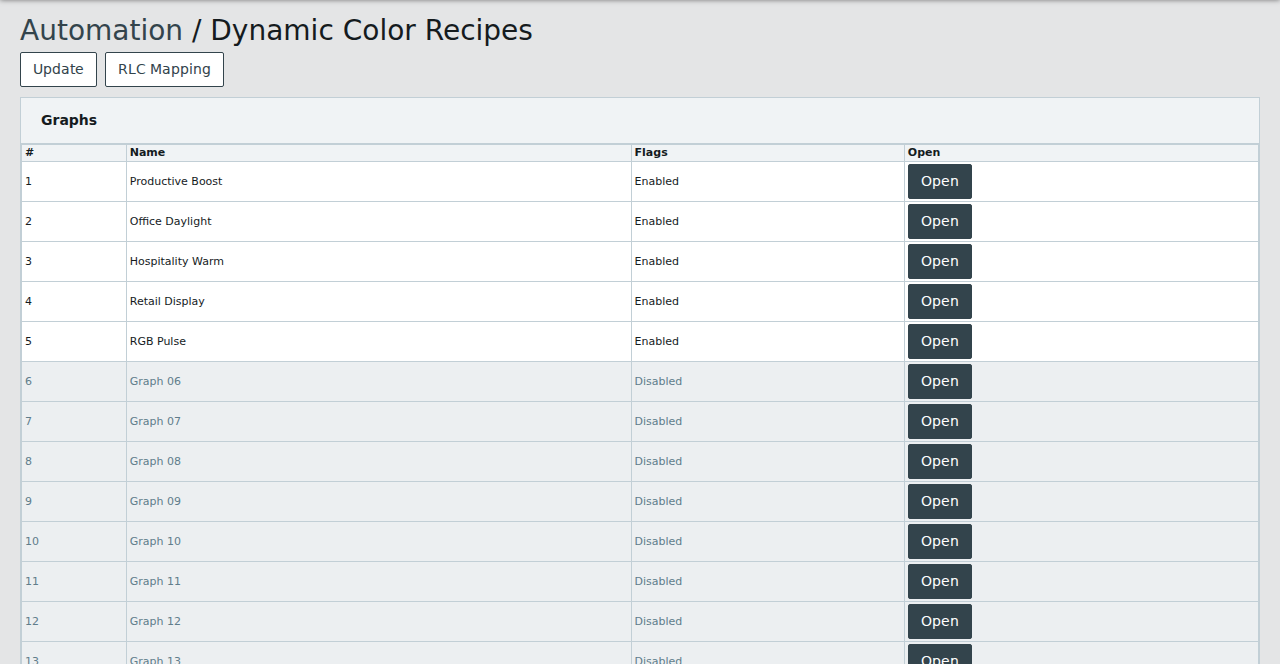
Dynamic Color Recipes List
Lists all available graphs and their status.
Clicking Open on a graph row opens the graph configuration page.
Dynamic Color Recipes Graph
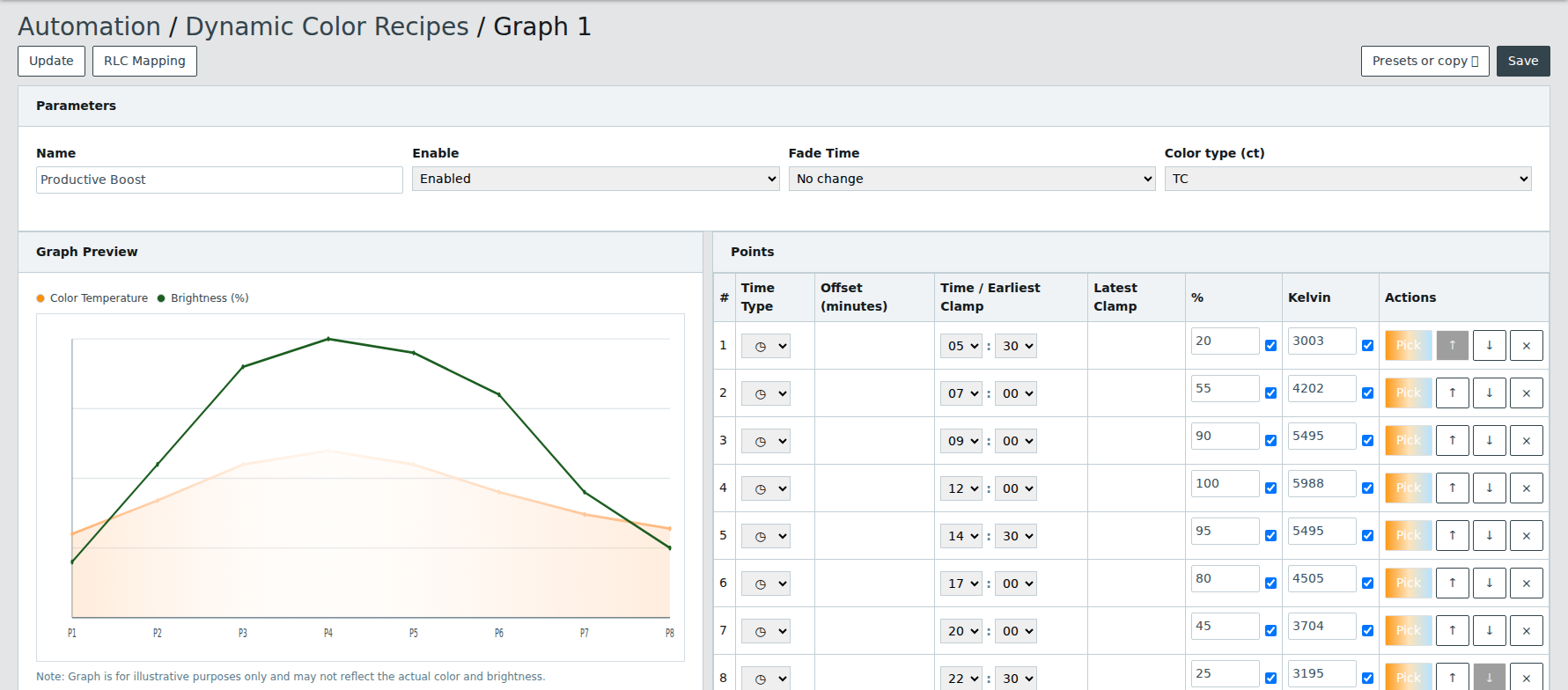
Allows modifying the parameters of a graph and its support points.
Parameters
Allows modifying the graph parameters such as its name, status, fade time and color type.
The graph parameters include:
- Name
- Enable
- Fade Time
- Color Type
Points
Each support point allows configuring:
- Time type (Fixed, Sunrise, Sunset)
- Time and offsets
- Brightness and color values
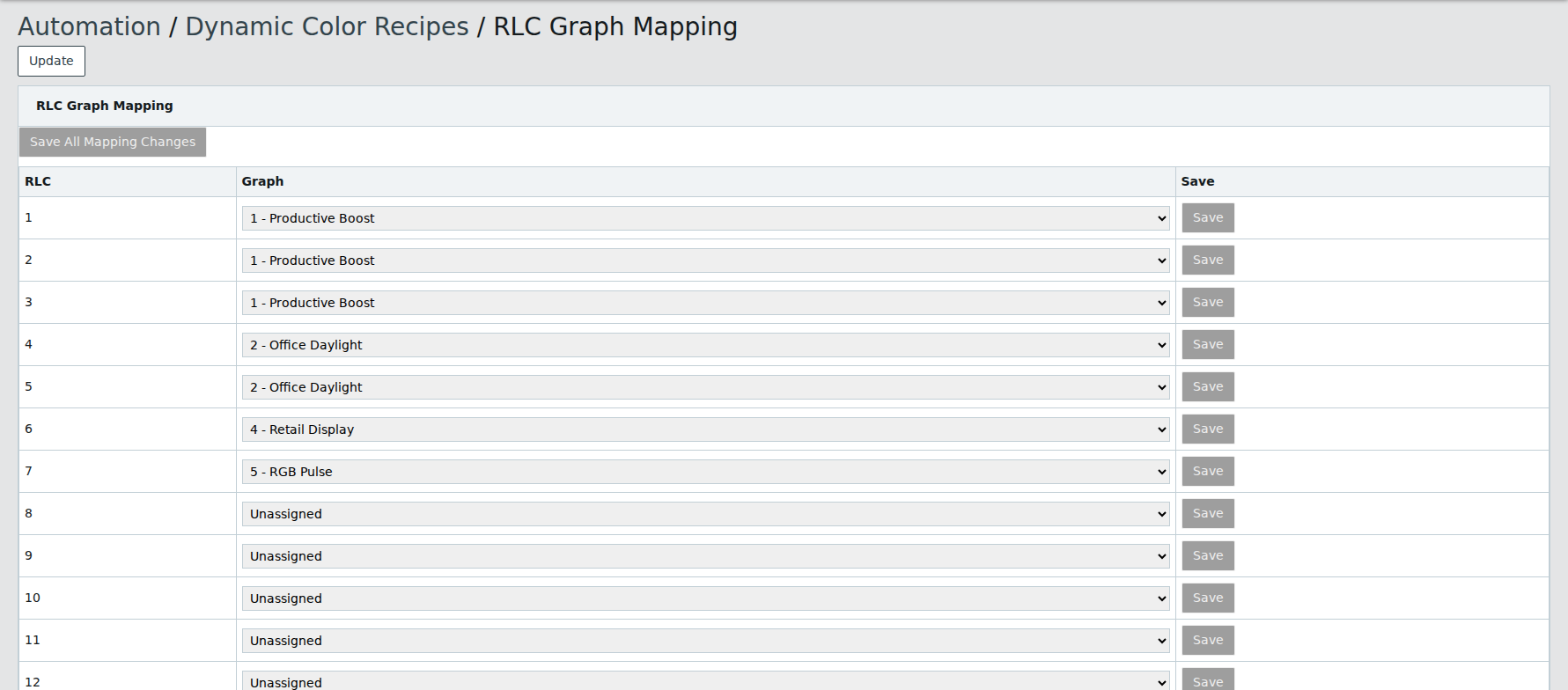
Dynamic Color Recipes RLC Graph Mapping
Allows configuring the mapping between Room Light Control and Dynamic Color Recipes graphs.
Each row maps one Room Light Control to a selected graph and can be saved directly.
Views
The Views feature enables creating custom dashboards tailored to the control and monitoring needs of rooms or zones. Each view uses a grid of cells, where cells can display labels, values, buttons, or lighting commands, and automatically expand when adjacent cells are unconfigured.
Remote Link
Remote Link shares lighting control between DALI channels and controllers on the same network.

The page groups four sub-pages.
| Page | Purpose |
|---|---|
| Link Network | Selects the Link Network this controller belongs to |
| RLC Links (Send) | Publishes Room Light Control values into Link IDs |
| Virtual Buttons (Receive) | Executes button events received from Link IDs |
| Link Monitor | Diagnostic view of the Link IDs seen on the network |
Link Network
Selects the Link Network (0-255) this controller belongs to. Values are only shared between controllers on the same Link Network.
RLC Links (Send)
Each entry publishes one value into a Link ID. Controllers receiving that Link ID apply the value. The value can come from a Room Light Control, or from a DALI occupancy or light sensor shared directly. Sharing a sensor directly needs no local Room Light Control on the sending side.
| Name | Description |
|---|---|
| Type | The value the entry sends. Disabled turns the entry off |
| Source | The Room Light Control the value is taken from, or, for the sensor types, the DALI sensor selected by channel and device |
| Link ID | The Link ID (1-32767) the entry publishes into |
| Heartbeat (min) | Interval at which the value is re-sent so late receivers stay in sync |
| Occupancy/Hold Slot | Receiver input slot (1-4) used for the RLC Occupancy, RLC Warning Hold and Occupancy Sensor types |
| Deadband (lx) | Minimum change in lux before a new RLC Light Level or Light Sensor value is sent |
Type
| Type | Description |
|---|---|
| Disabled | The entry does not send anything |
| RLC Occupancy | Sends the occupancy state, holding receiving Room Light Controls occupied while active |
| RLC Warning Hold | Sends the warning hold state, holding receiving Room Light Controls in warning hold while active |
| RLC Light Level | Sends the measured light level in lux, for daylight harvesting on the receiving side |
| RLC Commands | Forwards the Room Light Control output commands (on, off, scene, level, circadian, blink warning, etc.) |
| Occupancy Sensor | Sends a DALI occupancy sensor state directly, holding receiving Room Light Controls occupied while active |
| Light Sensor | Sends a DALI light sensor level in lux directly, for daylight harvesting on the receiving side |
The Occupancy Sensor and Light Sensor types publish a DALI sensor straight into a Link ID, without a local Room Light Control. When one of them is selected, the Source column lists the DALI sensors by channel and device.
The Occupancy/Hold Slot lets several senders hold the same receiver independently: the receiver stays held while any of its slots is active. The Deadband applies to the light level only.
Virtual Buttons (Receive)
A virtual button executes the button events received from its Link ID on this controller, exactly like a locally connected DALI push button. Long press dimming ramps are generated locally and protected by a fail-safe timeout.
| Name | Description |
|---|---|
| Receive from Link ID | The Link ID (1-32767) this virtual button follows. Empty disables the virtual button |
| Mode | Push Button or Switch, matching the source button behaviour |
| Destination Type | Channel / Group, Lamp, Commander, Commanders, Group Control, or RLC Outputs |
| Destination | The target that depends on the Destination Type |
| Command | The command executed on the destination |
| Value 1, Value 2 | The command values |
The destination, command and values follow the same rules as a physical DALI push button.
Link Monitor
Lists the Link IDs observed on the network, received from any publisher on the same Link Network, with their last value and publisher. The view updates automatically and is a diagnostic aid to confirm that senders and receivers use matching Link Networks and Link IDs.
| Column | Description |
|---|---|
| Network | The Link Network the value was received on |
| Link ID | The Link ID the value belongs to |
| Type | The value type (occupancy, warning hold, light level, command, button event) |
| Value | The last value received |
| Slot | The occupancy/hold slot, when applicable |
| Source Device | The publishing controller |
| Source IP | The IP address of the publishing controller |
| Age | Time since the value was last received |
Energy Usage Accumulated
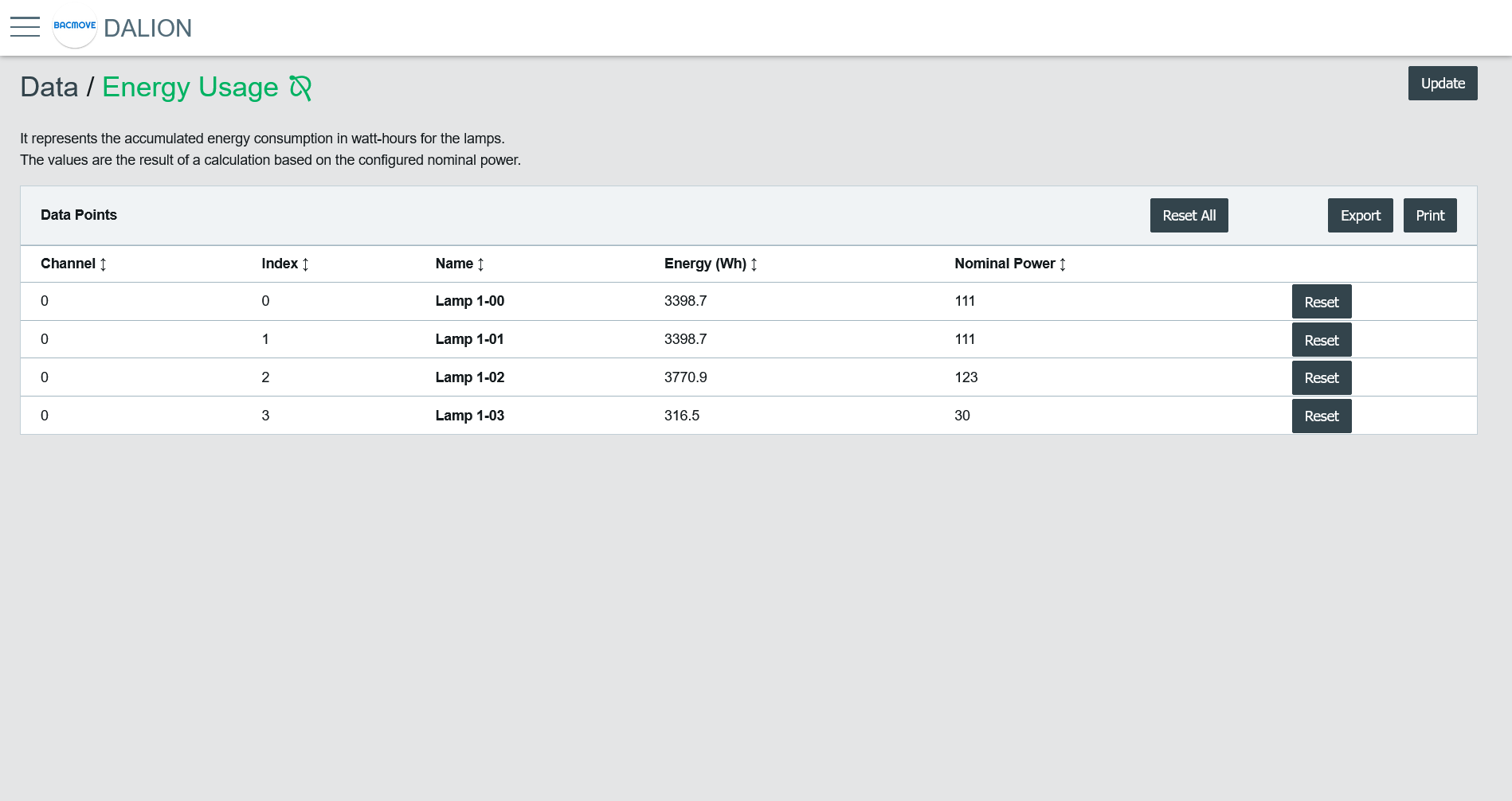
It represents the accumulated energy consumption in watt-hours for the lamps. The values are the result of a calculation based on the configured nominal power.
Data Points List
It list the accumulated energy for each configured lamp. Clicking on a collum name allows sorting the table.
Collumns
Channel
The lamp channel number, 1 to 4.
Index
The lamp index number, 0 to 63.
Name
The lamp name.
Energy (Wh)
The accumulated energy.
Nominal Power
The configured nominal power.
Change Time
The last time when the accumulated energy was saved.
Reset Time
The last time when the accumulated energy was reset or directly written.
Buttons
Print
It allows printing the accumulated energy consumption values.
Export
It allows downloading accumulated energy consumption values in a TSV (tab-separated values) file.
Reset All
Reset to zero the accumulated energy consumption for all lamps.
Reset
Reset to zero the accumulated energy consumption for the lamp.